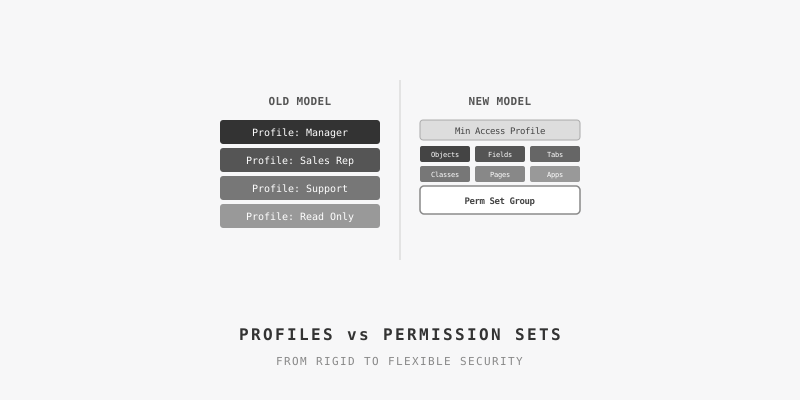
In the intricate world of Salesforce administration, managing user access is a delicate dance between granting enough permission for users to be effective and restricting access to protect sensitive data. This balancing act is the art and science of using Profiles and Permission Sets.
While historically Profiles handled the heavy lifting, the modern, recommended approach — and the future of Salesforce security — is a shift towards a more flexible, granular, and scalable model centered on Permission Sets.
The Science: Understanding the Core Components
To master the balance, you first need to understand the distinct roles of each component. This is the "science" of Salesforce security architecture.
Profiles: The Foundation
Think of a Profile as the blueprint for a user's base level of access. It's the "must-have" foundation that every user is assigned. However, in a modern security model, this foundation should be built on the principle of least privilege.
Best practice dictates starting with a minimal access profile, such as a clone of the "Minimum Access - Salesforce" profile. This baseline profile should control only the most fundamental settings that cannot be managed by Permission Sets, such as:
- Default Settings: Assigned apps, record types, and page layouts
- System-Level Access: Login IP ranges and login hours
- Password Policies
By keeping profiles minimal, you create a secure and consistent starting point for all users.
Permission Sets: The Building Blocks
If Profiles are the foundation, Permission Sets are the modular building blocks you use to construct a user's specific access. They grant additional permissions on top of the baseline profile. This additive model is what provides flexibility.
Key characteristics of Permission Sets include:
- Granular Control: They can grant specific access to objects, fields, tabs, Apex classes, and Visualforce pages
- Reusability: A single Permission Set, such as "Create and Edit Contacts," can be created once and then included in multiple Permission Set Groups for different roles
- Task-Based Creation: It's recommended to create Permission Sets based on the tasks users need to perform, rather than their job titles
Permission Set Groups: The Personas
Permission Set Groups are the final piece of the puzzle, allowing you to bundle multiple Permission Sets together to represent a specific job function or persona. For example, a "Sales Representative" Permission Set Group might bundle together individual Permission Sets for lead management, opportunity management, and quoting. This approach dramatically simplifies administration, especially in large organizations.
A powerful feature of Permission Set Groups is the ability to use muting permission sets. This allows an administrator to reuse a broad permission set within a group while selectively revoking specific permissions for that group only, avoiding the need to create a new, nearly identical permission set.
The Art: Strategy, Nuance, and Best Practices
With the scientific principles understood, the "art" of balancing these components comes into play. This involves strategic thinking, careful planning, and adherence to best practices to create a security model that is both robust and manageable.
Strategic Implementation
- Start with a Minimal Profile: Assign users a "bare-bones" profile that grants only the most basic access
- Create Modular Permission Sets: Develop a library of granular, task-based Permission Sets. This is where the bulk of the initial effort should be invested
- Build Personas with Permission Set Groups: Combine the modular Permission Sets into Permission Set Groups that correspond to the different job roles in your organization
- Manage Exceptions with Care: When a user needs a "one-off" permission, the solution is almost always to create a specific Permission Set for that need rather than creating a new Profile or granting overly broad access
Best Practices for Long-Term Success
-
Thorough Planning and Documentation: Before making any changes, it is crucial to audit existing permissions and document the new, persona-based strategy. This includes mapping user roles to their required tasks and permissions
-
Regular Audits and Maintenance: User access is not static. Conduct routine audits to identify and remove unused or excessive permissions. The Setup Audit Trail is an invaluable tool for tracking changes to permissions
-
Leverage Salesforce Tools: Salesforce provides tools to aid in this transition. The "User Access and Permissions Assistant" on the AppExchange can help analyze existing permissions and convert profiles to permission sets. Additionally, features like setting expiration dates for permission set assignments enhance security for temporary access needs
The Future Is Now: Transitioning Away from Permissions on Profiles
Salesforce has been signaling a move away from managing permissions on profiles for some time, with an original end-of-life announcement for Spring '26. While this enforcement has been postponed based on customer feedback, the recommendation remains clear: transition to a permission-set-led security model.
Starting this transition now, rather than waiting for a future enforcement date, allows for a more thoughtful and phased approach. This proactive stance not only improves your organization's security posture by reducing vulnerabilities but also ensures a scalable and maintainable system for years to come.
The initial effort of auditing, planning, and migrating may seem daunting, but the long-term benefits of a flexible, clear, and secure access management model are well worth the investment.